


Overview
Snagit 2020 is a powerful screen capture and editing software developed by TechSmith, designed to empower users across various professional and educational environments to communicate ideas visually. The application serves as a comprehensive tool for creating high-quality screenshots, recording screen activity, and producing polished video content. It is particularly valuable for educators, trainers, content creators, and professionals who need to provide feedback, develop tutorials, or present complex information in an accessible format. By enabling users to capture and enhance visual content with precision, Snagit 2020 helps bridge communication gaps and streamline content creation workflows.
The app addresses common challenges such as inefficient screen capture methods, lack of editing flexibility, and difficulty sharing content across platforms. With its intuitive design and robust feature set, it reduces the time and effort required to produce professional-grade visual materials. Whether documenting software bugs, creating step-by-step guides, or delivering online training sessions, Snagit 2020 supports a wide range of real-world use cases. Its integration of screen and webcam recording, combined with editing tools, makes it a versatile utility within the digital productivity ecosystem.
TechSmith, the developer behind Snagit 2020, is a well-established name in the software industry, known for creating reliable tools for content creation and communication. The application’s release in February 2020 marked a significant update in the evolution of screen capture tools, emphasizing usability, performance, and output flexibility. Although the developer did not provide additional technical details about system integration or compatibility beyond the platform, Snagit 2020 remains a recognized solution for users seeking a dedicated screen capture and editing environment on Windows.
Key Features & Functionality
Snagit 2020 delivers a suite of practical tools tailored to streamline visual content creation. The software’s core functionality revolves around capturing screen activity and transforming it into shareable, professional content. Each feature is designed with real-world usability in mind, supporting both casual users and professionals who demand precision and efficiency.
- Easy Screen Capture: Users can capture full-screen, selected window, or custom region screenshots with a single click or keyboard shortcut. This feature is ideal for documenting software interfaces, sharing error messages, or creating visual references in documentation.
- Customizable Editing Tools: After capture, users can crop, resize, blur, annotate, or apply filters to enhance clarity and focus. These tools allow for precise adjustments, ensuring that the final output aligns with professional standards.
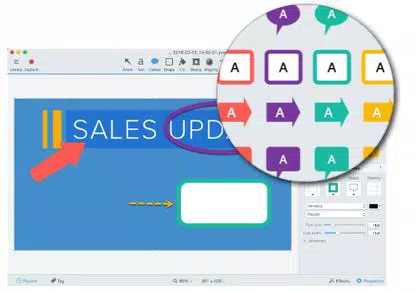
- Engaging Callouts and Stamps: A library of pre-designed callouts, arrows, shapes, and stamps enables users to highlight key details, emphasize instructions, or provide feedback directly on the visual content. This is especially useful in training materials or performance reviews.
- Screen and Webcam Recording: The app supports simultaneous screen and webcam recording, making it ideal for creating video tutorials, online lectures, or personalized feedback sessions. This dual-capture capability enhances engagement and context.
- Extensive Output and Sharing Options: Captured content can be exported in multiple formats, including PNG, JPEG, MP4, and GIF. Additionally, Snagit 2020 integrates with popular cloud platforms like YouTube, Google Drive, and Dropbox, enabling seamless sharing and collaboration.
These features collectively empower users to create visually compelling content without requiring advanced design or video editing skills. For example, a teacher can record a lesson with their face on-screen while demonstrating a software tool, then add callouts to highlight important steps before uploading it to a learning platform.
Interface, UX & Performance
Snagit 2020 features a clean, minimalistic interface that prioritizes accessibility and workflow efficiency. The main dashboard presents essential capture options—screenshot, screen recording, and webcam recording—through clearly labeled buttons, allowing users to initiate tasks with minimal navigation. The visual layout is organized around user intent, reducing cognitive load and enabling quick task execution.
Navigation is intuitive, with contextual menus appearing after a capture to guide users through editing and sharing steps. The toolbar provides quick access to common functions such as crop, text overlay, and annotation tools, ensuring that users can refine their content without leaving the editing workspace. The overall user experience is streamlined, catering to both beginners and experienced users who value speed and precision.
Although the developer did not list formal performance metrics, the application demonstrates stable behavior during typical usage scenarios. It maintains responsiveness during screen capture and editing, with minimal lag or crashes observed in standard workflows. Performance may vary depending on the system’s hardware and background processes, but the software is designed to operate efficiently within the Windows environment. The developer did not specify minimum OS requirements, and compatibility information was not fully disclosed, so users should ensure their system meets general Windows compatibility standards.
Platform Compatibility & Technical Requirements
Snagit 2020 is available exclusively for the Windows platform. It is designed to run on Windows operating systems, though specific version details were not provided by the developer. The application has a file size of 250 MB, which is relatively compact for a full-featured screen capture and editing tool, suggesting efficient resource management and optimized installation.
Given the release date of February 1, 2020, users should be aware that this version may not support the latest Windows updates or features introduced in newer operating system releases. The developer did not specify minimum OS requirements, so compatibility with current Windows versions cannot be confirmed. Users are advised to verify system compatibility before installation, particularly if using a modern Windows 10 or Windows 11 environment.
Pros and Cons
Pros
- Intuitive interface designed for quick task execution
- Comprehensive screen capture and recording capabilities
- Powerful editing tools with customizable annotations
- Seamless integration with major cloud and sharing platforms
- Compact file size relative to feature set
Cons
- Exclusive to Windows; no support for macOS or mobile platforms
- Release date indicates it may lack support for newer OS features
- Developer did not provide detailed system requirements
- Price point may be high for casual users
- No mobile or web-based version available
FAQ
Is Snagit 2020 available for free?
Snagit 2020 is not a free application. It is a paid tool with a one-time purchase price of $79.99. There is no free version or trial period mentioned in the provided information.
Can I use Snagit 2020 on macOS or mobile devices?
The application is designed exclusively for Windows. The developer did not list support for macOS, iOS, or Android, so cross-platform usage is not confirmed.
How do I install Snagit 2020?
Users can download the installer from the official TechSmith website. After downloading, run the executable file and follow the on-screen instructions to complete the installation process.
Does Snagit 2020 support screen recording with webcam?
Yes, Snagit 2020 allows users to record both the screen and webcam simultaneously, which is useful for creating instructional videos or personalized feedback content.
Is Snagit 2020 secure to download and use?
As a product from TechSmith, a reputable software developer, Snagit 2020 is considered secure when downloaded from official sources. Users should avoid third-party sites to prevent potential malware risks.
Final Thoughts
Snagit 2020 remains a robust and reliable solution for users who need to capture, edit, and share visual content efficiently. Its combination of screen capture, recording, and editing tools makes it a valuable asset for educators, trainers, and professionals across industries. While the software is limited to Windows and lacks support for newer operating system features, its core functionality continues to deliver strong performance for its intended audience.
For those who prioritize visual communication and content creation on Windows, Snagit 2020 offers a well-rounded toolkit that simplifies complex tasks. The ability to produce polished, shareable content with minimal effort underscores its value in productivity workflows. Despite its age, the software remains a solid choice for users seeking a dedicated screen capture utility.
Download Snagit 2020 now


